
Showing posts with label open source. Show all posts

Tuesday, January 26, 2010

Finally!! Made it Number 1 on Google!!!

Yay!!! I've finally made it to number 1 on google!!! You've got to love searching for yourself, it sometimes makes you feel better.
Here's a screenshot to prove it:


... and the search link: http://www.google.com.au/search?q=richard+schwarz

In related news (sort of) version 1.1 of the Woot! Public License will soon be released. Written to be understood by the lay IT person, it aims to maintain all the freedoms of the first license while more closely adhering to the Open Source Initiative's [link] definition of Open Source. Oh - and I've already created some software using the Woot! 1.1 Public License (a simple search and delete app in VB.Net).

That will probably be posted on Teaching IPT with a reference in this blog.

Enjoy!

Monday, November 30, 2009

Five Years of Firefox

Wow! Five years already!!! Who knew that time could go so fast.

Five years ago, Microsoft had killed off their major web browsing competitors and looked set to keep the throne for decades (mumble, grumble) to come. Then, like a phoenix rising from the ashes, Netscape reborn, rebadged and completely (pretty much) recoded, comes back on the scene as Mozilla Firefox.
With features that MS could only dream of and a user base which rapidly grew (and still is), Firefox reignited the Browser wars of yesteryear and warmed the hearts of so many who had been enslaved in the net pits of IE.
Now, after paving the way, and wounding the dragon, Firefox has allowed other browsers to also take up the fight to reclaim the Internet - welcome Chrome, hello on Win Safari, and Opera: just keep on singing.
So to say happy birthday, I've linked to the celebration page. Go there and rejoice for the reign of 'good enough' is almost at an end.

Five Years of Firefox

Posted using ShareThis

Saturday, November 21, 2009

Hang on - what is Google Operating System?

If you have no idea what it was that I was talking about in the last post, lucky for you that google has released a video for you:


Chrome Operating System - It's here!

Google has just released Chrome OS as Open Source and they've got bucketloads of videos out there.

I thought I'd post a very recent demo video (from Google's youtube channel) here - it's a live, working version.


What I find interesting is the absolute reliance upon the cloud. All documents etc are based "in the cloud" - or on a google server.

What I love is that it's not due for release for another year, but it's working and Google is mroe than willing to show it off.

There are more videos on the channel, but I thought I'd start with this one.

Thursday, October 22, 2009

Chrome Dev Version rocks!


I've taken the plunge and been trying out the Google Chrome dev channel releases.

Chrome 1 gave us speed
Chrome 2 gave us more speed
Chrome 3 gave us themes (kind of like igoogle)
and why am I using Chrome 4?

One reason, and one reason only:
Extensions.

Yep - that's right, extensions. And you know what? While there aren't actually all that many out there, the extensions I'm using don't appear to have slowed Chrome down. Not at startup, not during page rendering and not during shutdown. While Chrome's memory usage is a dog - because it seperates each tab out into seperate processes (really good idea by the way - seriously), the extensions don't seem to add anything.

This is really important, because I'm now going to get rid of Firefox... gasp! I don't really need it anymore - except to play Quake Live. Okay - I'm going to keep Firefox. For now.

Security issues - I'm not sure, but it still appears to be quite secure. I'll let you know if my bank accounts suddenly empty.

Try it or not. Extensions are cool

Tuesday, September 1, 2009

One way that Open Source will defeat the ogres of Closed software!

I was doing my daily digesting of comics (you really should try it, a bit of laughter is good for the soul... or is it chicken soup?), and laughed at this comic at dilbert.com:
http://dilbert.com/strips/comic/2009-09-01/

This reminds me of the fight over XML document standards... OO.o V MS anyone? I'm not 100% sure which one is which at the moment though. Hmmm.

I'm also just a tad freaked out that the guy doing the Kung Fu looks a little like me, and his Kung Fu is at about my level. Sheer coincidence? Quite possibly, but can we be sure? Hmmm.

Friday, July 10, 2009

Google Operating System... but not Android


Google has announced (http://googleblog.blogspot.com/2009/07/introducing-google-chrome-os.html) that it will be creating an Operating System specifically built for netbooks. It's not hard to see, though, Google expanding upon this over time to drive the OS onto the more traditionally bloated area of laptops and desktops. I'd be interested, for example, in putting it on (at least in a virtual machine) on my desktop for a look-see.

Some points of interest:
  • It will be built around the linux kernel - I bolded that for a reason. They're not building it around a linux distribution (eg. gOS or ubuntu etc).
  • From what I can gather, it will be a new windowed version of Chrome (the browser) running on top of that kernel - nice sandboxing of apps, just like in Chrome
  • It will be aimed 100% at web-apps only. This is obviously good for google - master of the web app domain
  • It will be open source. This means more security (read all about that here)
  • They've already got some hardware support (link)
  • Being made by google, and being based on chrome, you can bet that there will be a host of privacy concerns. Hmmmm. Better start watching for black 4WDs and people wearing sunglasses on cloudy days. :)

Obviously, there's a lot more points to note, but you can read about it in the google blog, or by doing a google search.

For those of you who are conspiracy freaks (like me), you could be forgiven for thinking that this is just one more step to google taking over the world!


But I love it.

Thursday, June 4, 2009

Chrome 2

Love it. It's like version 1, but better, faster and more... just more.

It's fast, really fast. I know that I've said that about Firefox before, but Chrome is really speeding along. I'm currently posting this using Chrome. Nice.It loads faster than either Firefox or IE 7 0r 8, which is saying something. You'd think the people who make the OS would be able to make it move.

I've noticed a few issues, though. While it is built on the open source project Chromium, it still uses a lot of personal information hooks (which google assures us are not too damning and/or permanent) including a unique ID for the download of Chrome that you're using.

Another issue is that of plugins. Nowadays, there's a lot of stuff out there which is quite useful to view in a browser (like pdf files) and Chrome, or at least my Chrome, won't open them. Not surprisingly things like flash and flvs (they are the file of choice behind most video sharing sites like youtube) do play, and play well, but the other, less googled plugins just aren't there.... yet.

Google has said that they are planning on building in a plugin architecture, but I understand their hesitancy in doing so.

There are two main problems with browsers including plugins: security and speed.
Security becomes an issue when you allow someone else to add scripts (often with a great amount of power/priveledges) to an otherwise secure browser. This reduces the possibility of a browser vendor being able to assure users of the security of their program. They have no power to control what the programmers of the plugin add to the code. And at the moment, Google have scored on the security issue. Its a complete redesign from the other browsers out there. I like that.

Secondly a browser will slow down the more plugins are added - this is simply because it is more program code which has to be run and stored in memory. A plain vanilla installation of Firefox is blazingly fast. Add a few plugins (say 10 or so) and it becomes less weildly and more labourious.

Anyway, at the moment I've got three browsers going: IE, Firefox and Chrome. IE because I don't have much choice, Firefox for the plugins (I do need them from time to time) and Chrome, because I like its user interface and its speeeeeeeeed.

Make up your own mind. After all, it is yours.

Sunday, May 31, 2009

Google Wave - A new (and better) form of communication


I thought I'd break my hiatus from blogging to bring this to you all. Firstly, because I'm really excited, and secondly because I'm really really excited.

Lars and Jens Rasmussen (the guys who basically created uber cool google maps) have gotten together, with a few other aussies in Sydney (yay!!!) and have come up with Google Wave.

"Uh huh?!" I hear you mutter at your screen(s). Well it is a really cool new communication form that kind-of melds email, IM, blogging, facebooking (or Orkuting for all you google freaks out there) and all those other types of messaging together.

Look, I really can't explain it enough, except to make one of my fatefull pronouncements (like the one I made back when google was next to unknown) and state simply - this will redefine the way you communicate online, and it will be the next big thing. Oops. That's done it.

No seriously, this isn't like "this is the year of Linux", or like "Duke Nukem Forever will come out, sometime"... this is for real. Even if no-one else reading this ever takes it up (silly people) I will.

Find out why by going to the google wave page (http://wave.google.com/) and watch the video and read all about it. Really - it's 1 hour 20 minutes in length, but if you're anything like me, you'll be sold after the first 10. And it actually makes sense.

BTW: this is the same video below.


Thursday, November 27, 2008

A bit weird, a bit funky and whole heap of OpenSource

Aussies can buy the XO OLPC online from November 30 - guaranteeing you're in the good books with the kids this Christmas.
(
http://www.pcauthority.com.au/News/129586,olpc-brings-weirdness-awesomeness-to-australia.aspx)

The XO OLPC (One Laptop Per Child) is a really rugged, cheap and Linux based laptop.


I think its pretty cool anyway... and did I mention, its cheap!

Sunday, June 22, 2008

Software I use: Productivity

There comes a time in one's life when one wants to do the same amount of work in less time. These are the tools I use to reduce the work I have to do in keeping my life going.

Productivity tools:

  • Office applications: Microsoft Office (http://office.microsoft.com/). Really, at the moment there's no true replacement, and that's for a lot of reasons. The main issue, of course, is market dominance. If I want to change to my preferred suite (eg. StarOffice - based on OpenOffice (http://www.openoffice.org)), then I need to convince everyone who uses my machine to swap as well. After all, I'm not going to pay for a licence I'm not going to use, now am I?
  • Calendar: Google Calendar (http://calendar.google.com) Google calendars are the only calendars that I need. Accessible from anywhere, easy to use - I've never seen a better design for quick and easy data entry, and there are plugins for pretty much every web-based tech you can find. I use Joomla! (http://www.joomla.org) and there are so many plugins for Google Calendar - it's crazy! My church website (http://www.christlife.org.au) uses Google Maps... the only problem is that I haven't told anyone yet, so it's a bit out of date.
  • Syncronisation: SyncBack SE (http://www.2brightsparks.com/downloads.html) has to be one of the easiest I've used - and efficient. Check it out.
I think that's about it... If you've got a suggestion for another type of productivity app (an area I haven't talked about) then comment it here. If you think you've got a better piece of software, let me know too!

Software I use (Internet)

I keep getting asked by people (friends, acquantainces, complete strangers etc) what software I use... what I think works and is good. Well, here's a little list of the software I use for various tasks.

Slight change: I've decided to do this bit in parts. That whay I can easily distinguish between the different types of software.

Note: I occaisionally use software that I don't think is necessarily the best, and I'll offer alternatives for them.

First, the Internet:

If you have a different opinion about what should be here, let me know!

Sunday, February 24, 2008

A User's View is moving...

Hi all,

A User's View (the blog about software useability) is moving to http://ausersview.blogspot.com and this space will become my personal blog - essentially a regular (hopefully) update to what is going on in and around my life.

Enjoy the new spot!

Wednesday, February 13, 2008

Get those add-ons working with Firefox 3 beta 3


As I've stated in the previous posts, getting those add-ons to work in the betas isn't as simple as clicking on the beautiful install button.

The problem we now have is that the vast majority of add-ons have been built for Firefox 1 & 2, and because FF3 is still in beta, not many of the developers have updated their add-ons.

Thankfully, unless the add-on deals with some of the core which has changed (e.g. bookmarks), it is quite simple to update them yourself. It requires little knowledge of anything other than how to use a good compression program (i.e. 7zip) and read files in notepad (although I like using notepad2). NOTE: both of those programs are Open Source and GPL'ed, so no philosophical issues here.

To start off, I'm going to install one of my favourite add-ons: Firebug. This is a nifty little tool, which is very useful for developers - unlike myself.

So let's get started.

1. Get the add-on. This is as simple as going to https://addons.mozilla.org/en-US/firefox/addon/1843 and clicking on the green 'Install Now' button.
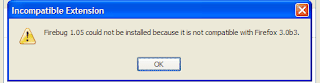
2. The add-on install will go as per normal, but will pop up an 'Incompatible Extension' error box - just as you thought all was hunky-dory.

3. Hmm... we now have a problem - but it can be fixed!
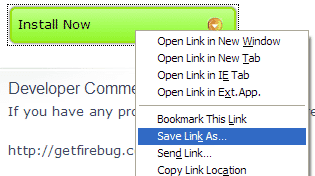
4. Go back to the add-on's page (https://addons.mozilla.org/en-US/firefox/addon/1843) and right-click on the link.
Select 'Save Link As...' and choose great little folder/directory in which to save the .xpi file.

5. This is now where 7Zip comes in handy. Go to the directory in which the .xpi is saved and open the file in your compression program of choice (if you haven't guessed, I choose 7Zip).

NOTE: The reason we can do this is that the .xpi file is actually an archive containing all the files needed for the add-on. We're going to change one - that's right, just one - file in that archive.

The steps I'm about to use are for 7Zip, so if you don't have it - get it. Really, it is the best compression program out there anyway.

6. Look for the file 'install.rdf', right-click on it and select 'Edit'. This is the main configuration file for the add-on.

7. We're going to change one - that's right, one - line in the file. Look for the code section:

<Description>
<em:id>{ec8030f7-c20a-464f-9b0e-13a3a9e97384}</em:id>
<em:maxVersion>2.0.0.*</em:maxVersion>
<em:minVersion>1.5</em:minVersion>
</Description>


We're going to change the value in <em:maxVersion> from 2.0.0.* to 3.0.*

8. Make the change and save the file. Exit your editor (again, mine was notepad2) and, if you're using 7zip, it will ask if you want to update the archive with the new file - select 'Yes'. If you're using some other program and it doesn't ask you, save your install.rdf file elsewhere and add it back in to the archive, making sure to overwrite the old one.

9. Close the archive and drag the .xpi file onto firefox. The install Add-On dialogue should come up and away you go.

Yet another Firefox review...


Ars Technica has put together another good review of Firefox, this one on beta 3.

For some reason, the winXP theme looks better on the screenshots than they do on my install. Incidentally, since firefox 3 beta 2, my number 1 choice in browser is Firefox.
Who cares that not all my extensions work - I can fix that. But man, the speed and memory management is great (and, I must add, long overdue).

Let the browser wars really get going.... again. And this time, let the little fellas win!

Firefox 3 Beta 3


I know, I know.... I didn't add all the stuff I said that I was going to with Firefox 3 b2, but now I can't anyway...

Firefox 3 Beta 3 is out.

Again, it's fast..., really fast. It makes IE 7 look like a turtle - in a straight jacket.

There are some cool new features (and some not so cool ones, eg. what is with the winXP icon set?), but it is a really good browser that does the job it is meant to.

It still doesn't have all the support of the extensions yet, but that will change as it leaves beta, and most of them can be modified to work with FF3b3 quickly and easily. I'll actually write about that really soon - it is so simple, anyone can do it.

Anyway, for a better review, go have a look at "A deep look to Firefox 3 Beta 3". It appears to be a pretty even handed review. And you don't have to wait for little old me, either.

Download it, install it, have the kind of fun we should have been having since Mosaic.

Saturday, January 19, 2008

Firefox 3 Beta 2: First Impressions - It's faaaast!

I like to get up to date with software, and I prefer using Open Source to Closed in most cases, but like others out there, I had found Firefox 2 to be a bit... well, memory hungry. It had what we geeks like to call a memory leak. Essentially this means that it just keeps on using up the RAM.
I still preferred it over IE6 (which was just a bit too dodgy for my liking, and hadn't been updated in years, but when IE 7 came out... I switched!

Then I heard (late) of the Firefox 3 beta. I downloaded a copy of Beta 1, installed it and... it was great! It was Firefox, but fast, until you opened up a few tabs. The Beta 2 came out and it is fast, and nowhere near a memory junkie.

That's my first impression - speed. It is faster than IE 7 - it even uses less memory than IE 7, which is cool. Now, even though it's just a beta, I've switched back to Firefox.

Thursday, January 17, 2008

The obligitory 'Welcome' post...

Sorry to do this to everyone, but here it is...

Welcome to richardschwarz.blogger.com: where software and thought combine.

This blog will contain my thoughts about software and even 'thinking type stuff'. If you want to know a user's perspective on software (which you should) then keep looking here.

I am an English and IT teacher to upper High School students (14 - 17 y.o.'s generally), and like to think that the two are actually complementary, rather than diametrically opposed.

Anyway, have a read. First cab off the rank will be my take on Firefox 3 beta 2. Preview: it rocks!